

crunch-node init, you get a fully working Crunch
Node powered by the crunch-node engine. This
page walks through how the default implementation works.
Architecture
The Crunch Node runs as a set of independent Docker workers that communicate through a shared PostgreSQL database. This separation ensures that real-time prediction gathering, scoring, and reporting can scale independently.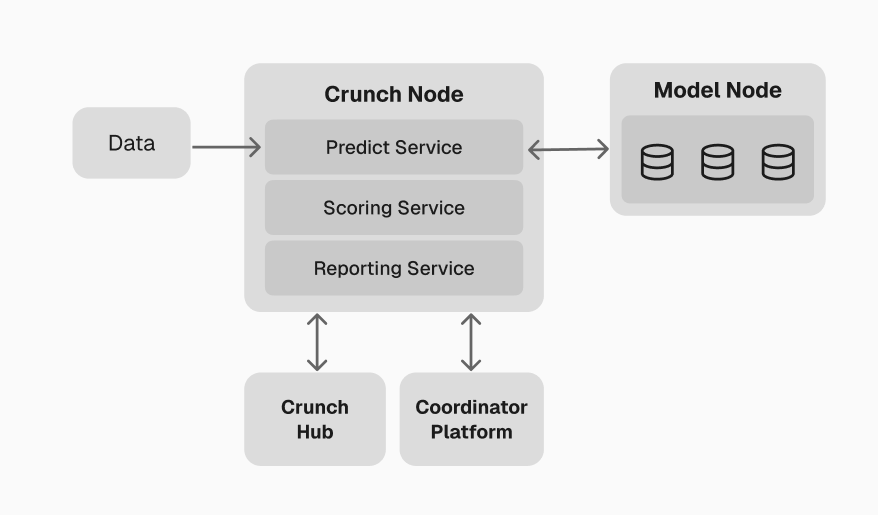
High-level overview of the local environment
Workers
Predict worker
The predict worker coordinates all participant models in real-time:- Reads latest feed data from the database
- Ticks all connected models — sends market data via the Model Runner Client so models can update their internal state
- Calls
predict()on all models for each configured scope (subject, horizon, step) - Stores raw predictions in the
predictionstable for asynchronous scoring
DynamicSubclassModelConcurrentRunner to fan out requests to all
models concurrently. Key configuration:
For details on model connection and request handling, see the Model Runner
documentation.
Score worker
The score worker transforms raw predictions into scores and leaderboard rankings. It runs independently from the predict worker, so CPU-intensive scoring never blocks real-time prediction collection. Pipeline:- Resolve ground truth — fetch realized values from feed records
- Score predictions — evaluate each prediction against ground truth using the configured scoring function
- Aggregate snapshots — combine per-prediction scores into model-level metrics over time windows
- Rebuild leaderboard — rank all models based on overall performance
- Prune old data — remove expired predictions and snapshots
Scoring function
The scoring function is a Python callable that you define in your challenge package. The default scaffold provides a placeholder inchallenge/starter_challenge/scoring.py:
SCORING_FUNCTION environment variable.
Multi-metric scoring
Every score cycle also computes portfolio-level metrics alongside the per-prediction scoring function. Active metrics are defined in yourCrunchConfig:
Scoring methodology detail
Scoring methodology detail
Individual prediction scoring:For each submitted prediction, the score worker:
- Validates the prediction returned the expected output shape
- Retrieves the realized ground truth from feed records
- Evaluates the prediction using the configured scoring function
- Stores the result in the
scorestable
- Recent score — performance over the most recent time window (detects current form)
- Steady score — medium-term performance (balances recency and stability)
- Anchor scores — per-parameter breakdown (by subject, horizon, step combinations)
- Overall score — weighted combination used for final ranking
Report worker
The report worker provides the HTTP API for accessing competition data. Key endpoints:API security
Endpoints are protected by API key authentication whenAPI_KEY is set in your environment. Public
endpoints (leaderboard, schema, docs) are always accessible.
Custom endpoints
Add endpoints by dropping Python files innode/api/:
.py file in api/ with a router attribute is auto-mounted at startup.
Configuration
All configuration is via environment variables innode/.local.env. The most important settings:
CrunchConfig
All type shapes and competition behavior are defined in aCrunchConfig object. The engine
auto-discovers your config from node/config/crunch_config.py:
Extension points
Customize competition behavior by setting callable paths in your environment:Next: Challenge package example
Learn how to structure the participant-facing package that ML engineers use to join your
competition.