

Quick Start
Get started by cloning the Coordinator Node Starter Kit from GitHub:Coordinator Node Starter Kit
A complete local setup for running a Coordinator Node with all required components, including
Model Orchestrator, scoring services, and web interface.
Prerequisites
Before starting, ensure you have:- Docker and Docker Compose installed
makecommand-line tool
Starting the Stack
From the root of the Starter Kit repository:What Gets Started
The starter kit provides a complete Crunch ecosystem that runs entirely on your local machine: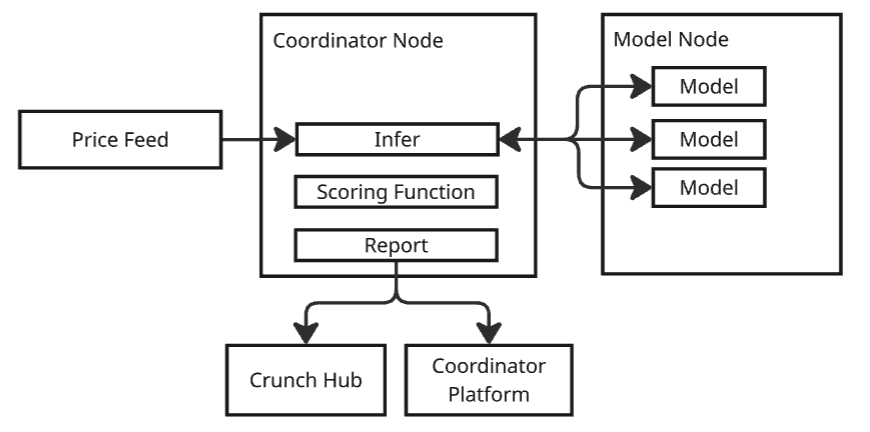
- Coordinator Node - Manages the competition lifecycle and model coordination
- Score Service - Evaluates predictions and generates rankings
- Report Service - Exposes HTTP API for results
- Predict Service - Collects predictions in real-time
- Model Orchestrator - Routes requests between models and services
- PostgreSQL - Persistent storage for predictions and scores
- Coordinator Platform - Web-based dashboard for managing the competition
Coordinator Platform
Once your local stack is running, access the Coordinator Platform at http://localhost:3000 to manage your competition.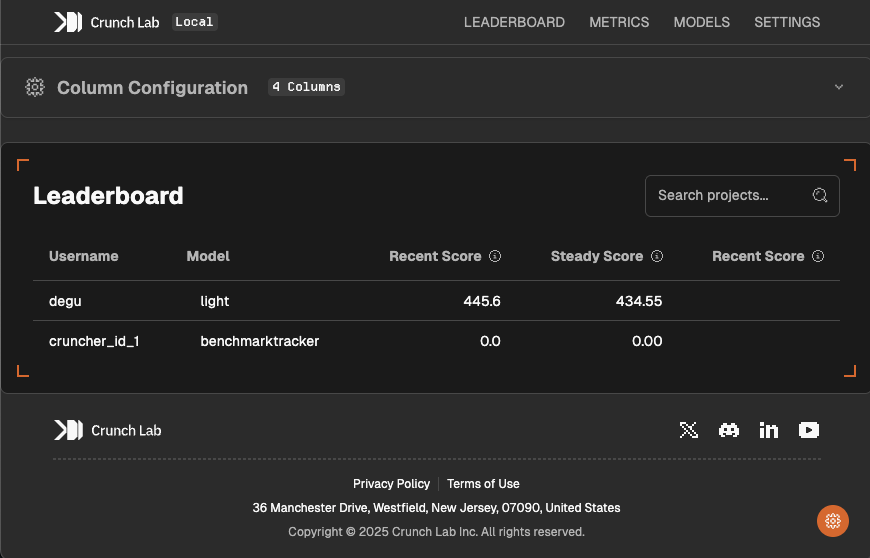
Features
The web-based platform provides complete control over your Crunch: Competition Management:- Leaderboard Configuration - Customize ranking display and refresh intervals
- Real-time Monitoring - Track active models and their prediction status
- Model Deployment - Upload and manage participant models
- Performance Analytics - Inspect detailed metrics and scoring history
- Log Viewer - Monitor Coordinator and Model Node activity in real-time
- Protocol Registration - Register your Coordinator Node on the Crunch Protocol network
- Configuration Management - Adjust scoring parameters and competition rules
Next Steps
With your local environment running, we recommend you first fully understand the Coordinator Node Reference Implementation and then build your own Crunch.1. Understand the Coordinator Node Reference Implementation
The complete working example that gets loaded by default when you start the local environment and demonstrates all components of a production-ready Crunch. The next section provides a detailed walkthrough covering:- Prediction collection and real-time orchestration
- Scoring methodology and leaderboard generation
- API endpoints for metrics and analytics
2. Understand the Condor Game Repository
We will go through the public Crunch Repository of the Condor Game. This is the entry point that ML engineers will use to build for your challenge. Its purpose is to present your challenge, clearly explain what you expect from participants, and provide everything needed to get started locally.3. Build Your Custom Crunch
After understanding the reference implementation, you’ll be ready to build your own Crunch. You can use the Condor Game repository as a reference or start from scratch. In both cases, you will need to:- Create your Coordinator Node Implementation
- Create your public Crunch Repository
Next: Condor Game Deep Dive
Walk through the complete Condor Game implementation to see how all components work together in a
real prediction market.