> ## Documentation Index
> Fetch the complete documentation index at: https://protocol.crunchdao.com/llms.txt
> Use this file to discover all available pages before exploring further.
# Local environment setup
> Launch your first competition on the Crunch Protocol by running a complete local development environment.
This guide will help you set up a complete local development environment where you can run and test
your own Crunch competition. By the end, you'll have a fully functional Crunch running locally —
complete with model orchestration, scoring, and a web-based dashboard.
## Quick start
Install the `crunch-node` package, which includes a CLI for scaffolding workspaces:
```bash theme={null}
pip install crunch-node
```
### Prerequisites
Before starting, ensure you have:
* Docker and Docker Compose installed
* Python 3.10+ and [uv](https://docs.astral.sh/uv/) installed
* `make` command-line tool
### Choose a pack (recommended)
Packs are prebuilt overlays for common competition types. Start by listing available packs:
```bash theme={null}
crunch-node list-packs
```
Current packs:
| Pack | Best for |
| ------------ | ---------------------------------------------------------------------------------------------------------------------------------------------------------------------- |
| `realtime` | Simplest format — predict next return. Single asset, short horizon (15 s interval, 60 s horizon). Great for first-time Coordinators. |
| `trading` | Signal-based competitions with PnL-style evaluation. Multi-asset workflows, trading-oriented metrics (PnL, hit rate, Sortino), and strategy-driven leaderboards. |
| `tournament` | Classic quant tournament format focused on ranking model quality over time (IC / residual scoring, 5 min interval, 1 h horizon). Best for research-heavy competitions. |
### Scaffold your workspace
Create your workspace with a pack:
```bash theme={null}
crunch-node init my-crunch --pack realtime
cd my-crunch
```
This creates:
```
my-crunch/
├── node/ ← Docker Compose, config, scripts (uses crunch-node from PyPI)
├── challenge/ ← Participant-facing package (tracker, scoring, examples)
├── webapp/ ← Local Coordinator Platform clone (starter + platform apps)
└── Makefile
```
If you omit `--pack`, the default scaffold is used. We recommend starting with a pack to get a
stronger baseline for scoring, examples, and UI configuration.
### Agentic Crunch Node building (recommended)
The generated workspace includes `.agent/` context and implementation guidance so you can build your
challenge in an agentic loop instead of editing everything manually.
A practical loop is:
1. Choose a pack close to your use case
2. Ask your coding agent to adapt `node/config/crunch_config.py`,
`challenge/starter_challenge/tracker.py`, and `challenge/starter_challenge/scoring.py`
3. Validate quickly with `make test` and `make verify-e2e`
4. Iterate until leaderboard and metrics match your intended behavior
This has been the fastest path in recent team testing because you start from a working baseline and
refine only the competition-specific pieces.
### Start the stack
From the `node/` directory:
```bash theme={null}
cd node
make deploy
```
### What gets started
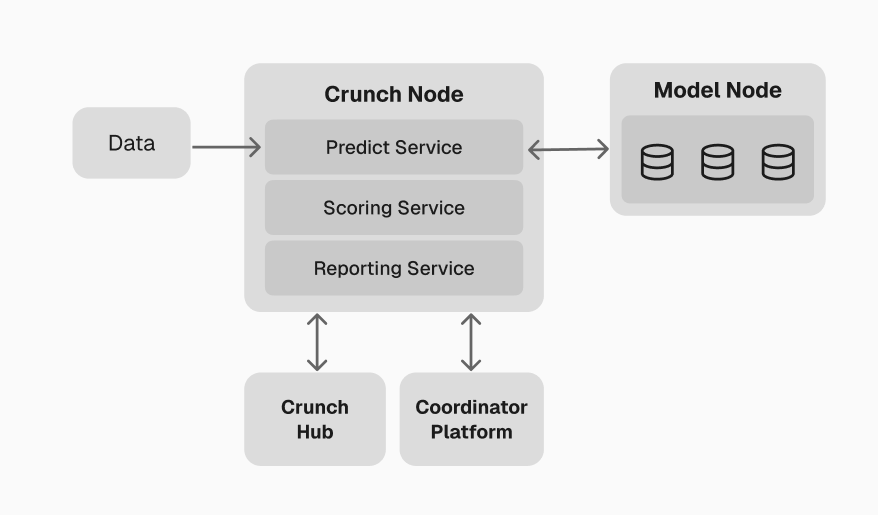
This launches a complete Crunch ecosystem on your local machine — core workers handling the full
pipeline from data ingestion through scoring and reporting, plus a Model Orchestrator, PostgreSQL,
and a web dashboard.
For a detailed breakdown of each worker and service, see the
[Crunch Node Example](/getting-started/crunch-node-example).
## Coordinator Platform
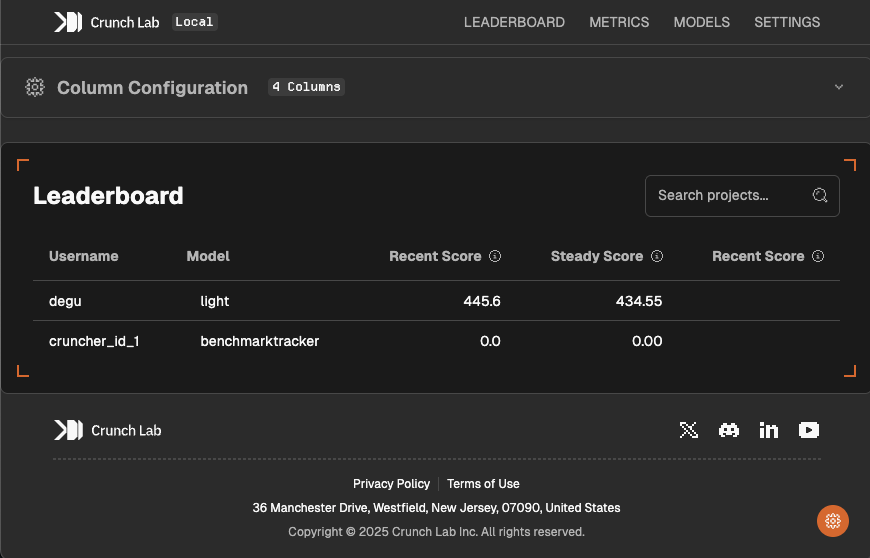
Once your local stack is running, access the **Coordinator Platform** at
**[http://localhost:3000](http://localhost:3000)**. This is the primary interface for managing your
Crunch — both locally and in production.
The platform provides complete control over your Crunch:
* **Leaderboard** — customize ranking columns and display
* **Model management** — upload, monitor, and manage participant models
* **Metrics** — real-time performance analytics and scoring history
* **Checkpoints** — create and manage reward distributions
* **Feeds** — monitor active data feeds
* **Logs** — view Coordinator and Model Node activity in real-time
When you move to testnet and mainnet, the same platform handles Coordinator registration,
certificate enrollment, Crunch creation, and publishing — replacing most CLI operations with a
guided web experience.
The leaderboard and metrics will be empty when you first start the local environment. Predictions
cannot be scored until their resolution time arrives (e.g., a 1-minute horizon requires 1 minute
before scoring begins). This is expected behavior.
## Next steps
With your local environment running, follow the remaining guides in order to understand the
reference implementation, then build and deploy your own Crunch.
The [Crunch Node Example](/getting-started/crunch-node-example) walks through the working
implementation that runs by default — covering the worker pipeline, data feeds, prediction
collection, scoring, and reporting.
The [Challenge package example](/getting-started/challenge-package-example) explains the participant-facing
repository — including the model interface, scoring helpers, and quickstarters.
[Define your own Crunch](/getting-started/define-your-own-crunch) by customizing the prediction task,
scoring function, and challenge package.
[Create a Solana wallet](/getting-started/wallet-and-cli-setup) and register as a Coordinator
through the Coordinator Platform.
Use the Coordinator Platform to push your Crunch to
[Testnet](/getting-started/testnet-deployment) for testing, then
[Mainnet](/getting-started/mainnet-deployment) for production.
Walk through the default implementation to see how all workers and services fit together.
 The platform provides complete control over your Crunch:
* **Leaderboard** — customize ranking columns and display
* **Model management** — upload, monitor, and manage participant models
* **Metrics** — real-time performance analytics and scoring history
* **Checkpoints** — create and manage reward distributions
* **Feeds** — monitor active data feeds
* **Logs** — view Coordinator and Model Node activity in real-time
When you move to testnet and mainnet, the same platform handles Coordinator registration,
certificate enrollment, Crunch creation, and publishing — replacing most CLI operations with a
guided web experience.
The platform provides complete control over your Crunch:
* **Leaderboard** — customize ranking columns and display
* **Model management** — upload, monitor, and manage participant models
* **Metrics** — real-time performance analytics and scoring history
* **Checkpoints** — create and manage reward distributions
* **Feeds** — monitor active data feeds
* **Logs** — view Coordinator and Model Node activity in real-time
When you move to testnet and mainnet, the same platform handles Coordinator registration,
certificate enrollment, Crunch creation, and publishing — replacing most CLI operations with a
guided web experience.